
|
This integration is part of the Cloudbeds Preferred Partner Program Preferred Partners are trusted, high-quality solutions recognized for reliability, strong adoption, and measurable impact for our customers. |
- Amadeus' market-leading iHotelier (former Travelclick) Reservations and Booking Engine solutions deliver unmatched flexibility and distribution scale for independent hoteliers and mid-scale chains.
- Create new demand and increase revenue with our powerful iHotelier Central Reservations System by automating distribution across web, mobile, voice, travel agent, OTA, and metasearch channels.
- Leverage our Booking Engine’s data-driven design to engage more users and remove barriers to conversion. Centralize management of ARI to decrease the time, effort, and cost of distribution. Work with a single vendor to meet all your distribution and booking requirements.
Check more about what a CRS is and its benefits here: CRS (Central Reservation Systems) - Everything You Need to Know
Connecting process
Step 1 - Connect your channel account through Cloudbeds PMS
- Access Account
-> Settings
-> Distribution
- On the Discover tab, search for Amadeus by iHotelier CRS, and click on the channel card.
- If you have an account, click Enable Channel.
- If you do not have an account, click Create New Account.
- Connection Type: Select your preferred connection type. This integration supports Full and Custom connections.
- Use the iHotelier Interface Code and iHotelier password credentials provided by Amadeus. Click Continue.
- Map your rooms. The list of iHotelier's accommodations is displayed in the drop-down list in the Channel Accommodation column.
- Rate Plan Mapping. The list of iHotelier's rate plans is displayed in the drop-down list in the Channel Rate Plan column.
- Add a Base Rate Adjustment for each room type (if needed). When completed, click Continue, or leave it at zero if you want to skip it.
- Configure Extra settings and click Save.
Step 2 - Apply taxes and fees
You must configure the tax/fee in the Third Party sources section in Cloudbeds. In Cloudbeds, taxes and fees for CRS reservations are determined by either the reservation's Source or Origin:
- Source: This is always listed as 'iHotelier' for all CRS reservations.
- Origin: This indicates where the reservation originated, such as a call center, web, booking engine, OTA, etc. The Origin can vary.
Applying Taxes and Fees:
- If only the Source is configured: If the Source is 'iHotelier' but the Origin (e.g., 'Call Center') is not configured as a Third Party Source, then the taxes and fees configured for 'iHotelier' will be applied.
- If both Source and Origin are configured: If both the Source ('iHotelier') and the Origin (e.g., 'Booking.com') are configured as third-party Sources, then the taxes and fees configured for 'Booking.com' will be applied.
By configuring third-party sources in Cloudbeds, the correct taxes and fees are applied based on the specific details of the reservation's Source and Origin.
Reservation Details
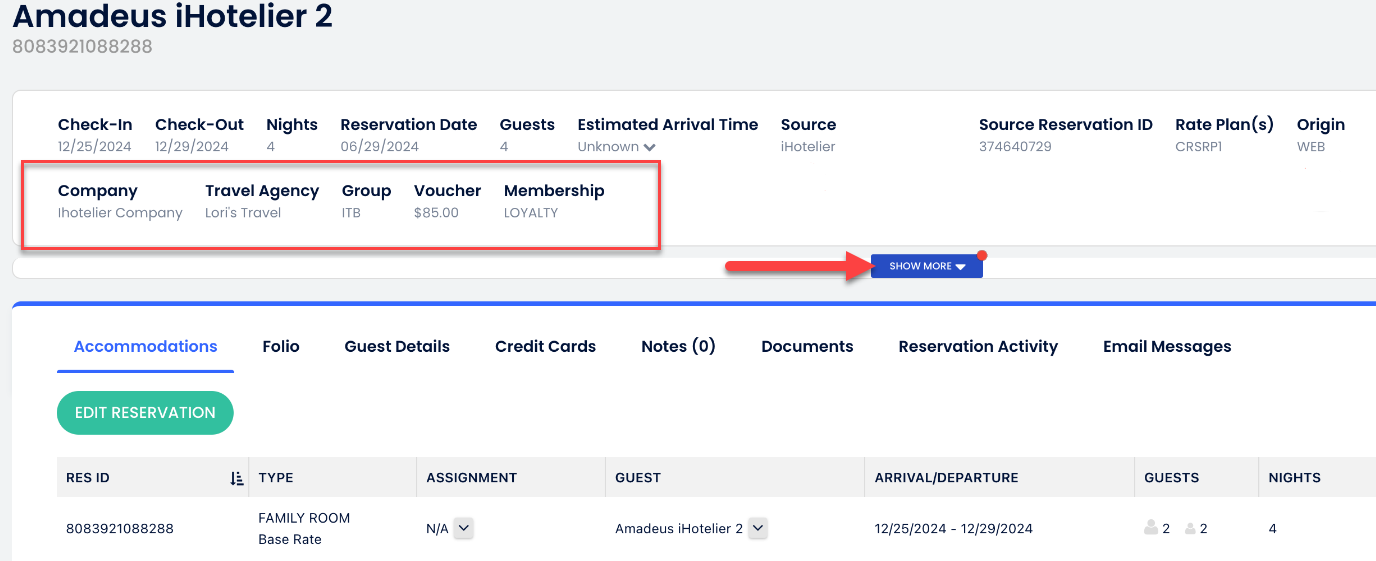
A few new fields related to CRS reservations are displayed on the reservation's header and in the "show more" section. Note that these fields provide additional information and do not impact the reservation process. For instance, the voucher information is not automatically applied to the reservation folio. If there are any necessary changes to the reservation folio, the property staff must apply them manually.
1. Company Information
2. Travel Agency Information
3. Membership Information
4. Group Information
5. Voucher Information
6. Extra Services under the Special Requests section
Supported Features
The channel supports:
- Advanced Channel Rates allow you to sync multiple Cloudbeds rate plans to multiple rate plans on a channel. If this feature is not yet enabled for you and you would like it activated, contact Cloudbeds Support.
- Close Days: Stop the sale of channel accommodations on a daily basis. Use the "Accommodation Blocked" setting on the Availability Matrix to control this setting.
- Closed to Arrival: Prevent guests from arriving on a specific date. Use the Availability Matrix to control this setting.
- Closed to Departure: Prevent guests from checking out on a specific date. Use the Availability Matrix to control this setting.
- Minimum length of stay: The minimum number of nights a guest must stay when arriving on a specific date. Use the Availability Matrix to control this setting.
- Maximum length of stay: The maximum number of nights a guest can stay when arriving on a specific date. Use the Availability Matrix to control this setting.
- Cancellations: Channel sends reservation Cancellations to Cloudbeds directly.
- Modifications: Channel sends reservation modifications to Cloudbeds directly.
- Per Person Pricing: Pricing is based on the number of occupants (also known as Occupancy-based Pricing). iHotelier does not support this at the calendar level, but properties can set extra person pricing for both Adults and Children during channel setup.
- Display Group Information: Shows group bookings, Travel Agency, Company, Voucher, and Extra Services information in Cloudbeds (from Amadeus).
- Guest Marketing Opt-in: Automatically records a guest’s marketing email opt-in or opt-out preference when the booking is received from the channel, supporting GDPR compliance and ensuring accurate communication preferences in Cloudbeds.
- Custom Connection Types: Ability to configure a Full or Custom connection based on property needs.
The channel does not support:
- Booking Cutoffs
- Last Minute Booking
Benefits
- With Cloudbeds, the industry’s only truly unified PMS platform, you can integrate with the Amadeus CRS while managing your calendar, channels, housekeeping, and everything else you need to run your business in one place.
- The Cloudbeds + Amadeus integration offers a full two-way exchange of data, including real-time sync of rooms, rates, and availability. It leverages the latest APIs for optimized configuration, minimizing the risk of overbookings and rate disparity.
- Expand your distribution options by tapping into an extended network of 400+ channels through the Amadeus iHotelier CRS and Cloudbeds Channel Manager, increasing booking potential.
- Cloudbeds directly support cancellations on connected channels. If a reservation is canceled on the channel, it updates in Cloudbeds. If the reservation is canceled in Cloudbeds, we update the availability. But we can't cancel directly in the CRS or OTA. If a guest cancels via the CRS/OTA, it also gets canceled in Cloudbeds.
- We don’t have no-show reporting for this integration yet, but we do have it for Airbnb and other channels.
Contact support to disconnect the channel
If you disable the channel yourself, this will not stop billing! You can disable the channel and re-enable it when you choose to.
Important
To ensure a smooth and accurate integration with Amadeus iHotelier, please be aware of these key details about how reservations are imported.
1. Tax Configuration: Inclusive Taxes Only
The Amadeus integration is designed to work with inclusive taxes. If your property uses exclusive taxes in Cloudbeds, reservations imported from Amadeus will still have taxes included in the room rate.
To avoid this, we recommend setting up your taxes as inclusive to align with how Amadeus sends reservation data.
2. Manually Adding Add-ons and Extras
Any add-ons or extras a guest purchases through the Amadeus booking engine will not be automatically added to the guest's folio in Cloudbeds.
Instead, this information will appear as a "special request" note within the reservation details. You will need to manually add these charges to the guest's folio to ensure accurate billing.
Comments
Please sign in to leave a comment.